
Welcome to our free online HEIC to JPG converter! If you’re looking for a seamless way to convert your HEIC images to the widely compatible JPG format, you’ve come to the right place. Our tool allows you to quickly and easily convert HEIC files to JPG, ensuring your photos are viewable on any device. Let’s explore why converting HEIC to JPG is essential and how our converter simplifies the process.
Introduction to HEIC to JPG Conversion
What is HEIC Format and Why Convert HEIC to JPG?
The HEIC format, or High Efficiency Image File format, is a modern image format primarily used by Apple devices since iOS 11. While HEIC offers superior image compression and image quality compared to JPEG, its limited compatibility can be a hassle. To ensure your images are accessible on various platforms and devices, you might need to convert HEIC to JPG, making the images widely compatible.
Benefits of Converting HEIC to JPG Online Free
Converting HEIC to JPG online free offers numerous advantages. The JPEG format ensures compatibility across various devices and operating systems. When you convert HEIC to JPG, you can easily share images with friends, family, or colleagues without worrying about whether they can view HEIC files. Our free online HEIC to JPG converter simplifies this process, saving you time and effort.
After converting HEIC to JPG, you can further optimize your images using our JPG to WebP Converter Online Free for better web performance.
Why Use a Free Online HEIC to JPG Converter?
Using a free online HEIC to JPG converter like ours eliminates the need for specialized software or downloads. You can convert your HEIC files to JPG directly in your browser. Our free online converter offers a convenient and accessible solution for converting your HEIC images to JPG, ensuring compatibility and ease of sharing, without compromising the image quality.
Step-by-Step Guide to Convert HEIC to JPG Free Online
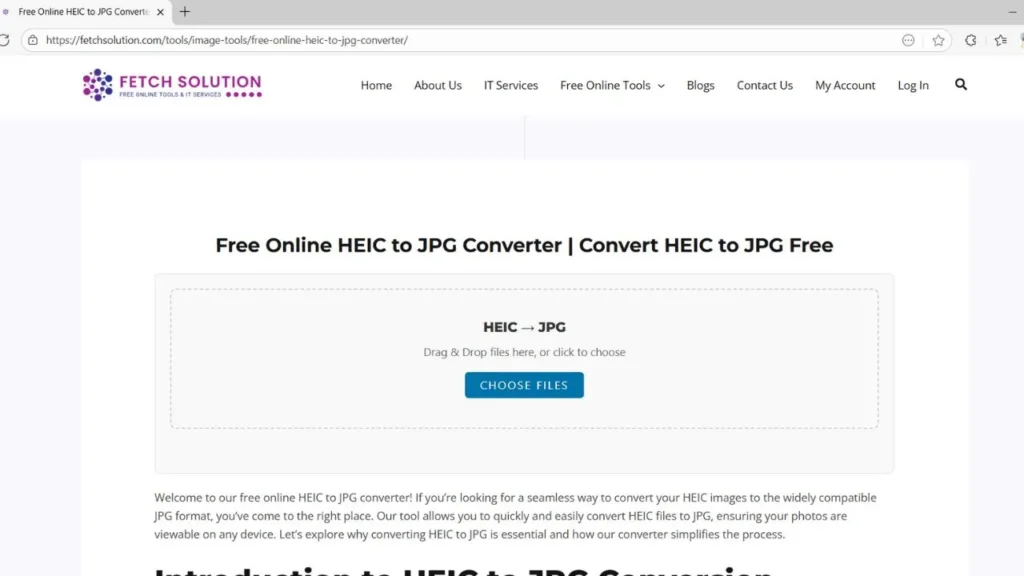
Using Our Free Online Converter HEIC to JPG Tool
Our free online converter is designed to be user-friendly, making the process of converting HEIC to JPG as simple as possible. To begin, simply upload your HEIC image to our tool using the “drag and drop” feature or by selecting files from your device. Once uploaded, our converter will automatically convert the HEIC file to JPG format, preserving the quality of the original image.
How to Convert HEIC Images to JPG Instantly
Converting HEIC images to JPG instantly is easy with our tool. First, upload your HEIC images to our JPG converter. Our system processes the HEIC file quickly, and then you can download the JPG file. This process can be done from any modern browser, meaning you can convert HEIC images to JPG on any device, without compatibility issues. You don’t need to install any additional software.
Tips for Efficient HEIC to JPG Conversion Online
For efficient HEIC to JPG conversion online, consider converting multiple HEIC images at once to save time, as our tool supports batch conversion. Also, be mindful of the final file size and image quality settings, if available, to balance compatibility and visual fidelity. When you convert your HEIC images to JPG, ensure the converted images are properly backed up.
Platform and Device Compatibility
HEIC to JPG Converter Online for Windows
Our free online HEIC to JPG converter is fully compatible with Windows operating systems. Windows users can easily convert HEIC files to JPG format directly in their browser without needing to download any additional software. Simply upload your HEIC image and let our tool handle the JPG conversion seamlessly, preserving image quality and ensuring the converted JPEG format is readily accessible on your Windows device.
Convert HEIC Files to JPG Free on macOS
macOS users can effortlessly convert HEIC files to JPG free using our online converter. Since macOS also supports the HEIC format, there may still be times when you need to convert your HEIC images to JPG for broader compatibility. Our online tool provides a convenient solution, allowing you to upload your HEIC image and quickly convert it to the JPEG format, ensuring seamless sharing and viewing on any device.
Linux Convert HEIC to JPG – Easy and Fast
For Linux users, converting HEIC files to JPG can sometimes be challenging due to limited native support for the HEIC format. However, our free online converter makes it easy to convert HEIC to JPG on Linux systems. Simply access our website through your browser, upload your HEIC file, and convert it to the JPG format, ensuring compatibility and easy sharing, regardless of your operating system.
Bulk HEIC to JPG Conversion Options
How to Convert Multiple HEIC Files to JPG Online Free
Converting multiple HEIC files to JPG online free is streamlined with our bulk conversion feature. You can upload several HEIC images simultaneously to our free online converter, and our tool will process them all at once, converting each HEIC file to JPG. This saves considerable time and effort compared to converting each image individually, making it ideal for users dealing with numerous HEIC images. Our tool is the best HEIC to JPG converter for large batches of files.
Benefits of Bulk Conversion with Free Online HEIC to JPG Converter
The benefits of bulk conversion with our free online HEIC to JPG converter are numerous. Bulk conversion saves time, allowing you to convert multiple HEIC to JPG files in a single session. It also ensures consistency in the conversion process, maintaining the same image quality and settings across all converted files. Upload multiple images and convert multiple HEIC to JPG files to maintain compatibility across devices.
If you often work with web-optimized formats, try our PNG to WebP Converter Online to compress images without losing quality.
Using Our Converter HEIC to JPG Online for Multiple Files
Using our online converter to convert HEIC to JPG for multiple files is straightforward. Simply select all the HEIC images you want to convert, upload them to our site using the “drag and drop” feature, and initiate the conversion process. Our tool will convert multiple HEIC files to JPG, providing you with a zip file containing all the converted JPG images, ready for download and use. You can drop your HEIC file to start conversion.
Start Converting Your HEIC Files Now!
Why Choose Our Free Online HEIC to JPG Converter Tool?
Our free online HEIC to JPG converter stands out due to its ease of use and efficiency. You can quickly convert HEIC files to JPG without downloading any software or paying any fees. We prioritize your data security and ensure high image quality during the conversion process. It’s the best HEIC to JPG converter available, designed to provide a seamless experience when converting HEIC images.
Get Started with Your First Free HEIC to JPG Conversion
Getting started with your first free HEIC to JPG conversion is incredibly simple. Just drag and drop your HEIC file into the designated area, and our free online converter will automatically convert HEIC to JPG. You can then download your new JPG file instantly. This process ensures that even first-time users can easily convert their HEIC images to the JPEG format.
Share Your Experience and Feedback
We value your feedback and encourage you to share your experience using our free online converter. Your input helps us improve our tool and provide the best possible service. Let us know if you found the tool helpful in converting HEIC files to JPG and if you have any suggestions for improvement. Your feedback helps us to improve the conversion process for converting HEIC images to the JPG format.
Want to explore more? Visit our full Fetch Solution Tools Directory for all your conversion and optimization needs.
Frequently Asked Questions about HEIC to JPG Conversion
Common Issues When Converting HEIC to JPG Free Online
Converting HEIC to JPG online is generally straightforward, though you may sometimes face issues like file size limits, slow upload speeds, or unexpected conversion errors.
If this happens, ensure you have a stable internet connection and consider reducing the image size before converting. You can also re-upload the file or contact our support team for help with your HEIC to JPG conversion.
Understanding HEIC and JPG Image Quality Differences
Understanding the image quality differences between HEIC and JPG is essential. HEIC offers better compression and image quality compared to JPG, meaning that HEIC files maintain a higher visual fidelity at smaller file sizes. However, when you convert your HEIC image to the JPG format, some image quality might be lost due to JPG’s compression methods. Our converter strives to minimize this loss during the conversion process.
What to Do If HEIC to JPG Conversion Fails?
If your HEIC to JPG conversion fails, start by checking that the HEIC file isn’t corrupted. Try uploading it again or switch to a different browser to see if the issue resolves.
If the problem persists, clear your browser’s cache and cookies, then re-upload the file. Should the conversion still fail, contact our support team for quick assistance — we’ll help you complete your free HEIC to JPG conversion without any hassle.