
Looking for a seamless way to convert your AVIF images to the widely compatible PNG format? Our free and fast online AVIF to PNG converter is the perfect solution. Whether you’re converting a single AVIF file or need a batch conversion for multiple AVIF files, our tool delivers high-quality results in seconds. Say goodbye to compatibility issues and hello to easy image conversion!
Understanding AVIF and PNG Formats
Before diving into the conversion process, it’s helpful to understand the nuances of AVIF and PNG formats. Knowing their strengths and weaknesses will help you appreciate why converting AVIF to PNG can be beneficial in certain situations. With a clear understanding of image file formats, you are assured of better image quality.
What is AVIF?
AVIF, or AV1 Image File Format, is a modern image format employing the AV1 video codec for compression. It boasts superior image quality at smaller file sizes compared to JPG, offering efficient lossless compression. This makes AVIF ideal for web images where bandwidth is a concern, but not all browsers or software fully support the AVIF format yet.
Benefits of PNG Format
PNG, short for Portable Network Graphics, is a raster graphics file format known for its lossless compression and support for transparency. This image format is widely supported across web browsers and image editing software, making it a universal choice for images that require high quality and detailed preservation without loss of data. The PNG format is best for images and logos.
Why Convert AVIF to PNG?
While AVIF offers excellent compression and quality, its limited compatibility can be a hurdle. Converting AVIF to PNG ensures your images can be viewed and edited on virtually any device or platform. Converting AVIF images to PNG gives you broader access. By performing the conversion, you are able to easily share your images.
How to Use the AVIF to PNG Converter
Our online AVIF to PNG converter is designed for simplicity and speed. With just a few clicks, you can convert your AVIF files to PNG format, ensuring compatibility and quality. This free-to-use converter online is the best AVIF to PNG solution for both novice and expert users. Start your conversion now!
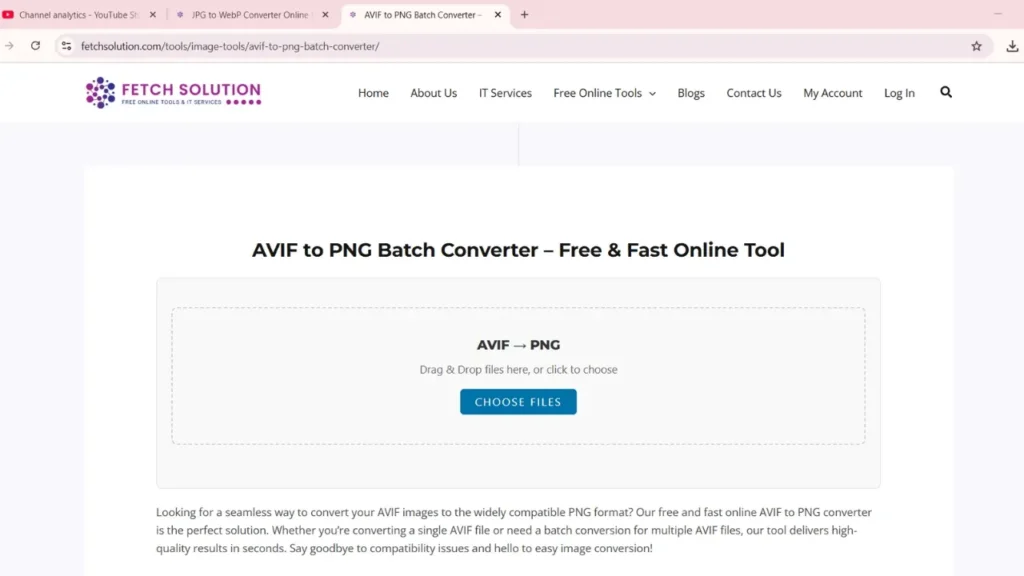
Step-by-Step Conversion Process
Here’s how the AVIF conversion works:
- Drop your AVIF images into the converter.
- The online converter will automatically convert your AVIF files to PNG format.
Once the conversion is complete, download your new PNG file. Convert your AVIF images with just a few clicks to PNG in seconds.
Batch Convert Multiple AVIF Files
Need to convert multiple AVIF files at once? Our batch conversion feature allows you to convert multiple AVIF images to PNG simultaneously, saving you time and effort. This batch convert functionality makes it easy to convert images to PNG format, streamlining your workflow. Convert multiple files to PNG with ease and efficiency.
Upload limits: max file size 5 MB per file. Logged-in users can upload up to 20 files per batch; guest users can upload up to 5 files. For larger batches, split into smaller groups.
Drag and Drop Features for Easy Upload
Our converter supports drag and drop functionality, making it incredibly easy to upload your AVIF files. Simply drag and drop your AVIF images onto the converter, and the conversion process will begin automatically. This feature simplifies the process to simply drop your AVIF images and start converting AVIF to PNG.
AVIF to PNG Conversion on Linux, macOS, and Windows
Convert AVIF to PNG on Linux (Command-Line & Tools)
For Linux users, converting AVIF images to PNG format can be achieved through command-line tools like ImageMagick or dedicated software. These tools offer flexibility and control over the conversion process, allowing for batch conversion and customized settings to optimize image quality and file size. When converting AVIF to PNG on Linux, ensure you have the necessary codecs installed for seamless conversion.
# ImageMagick (if libheif installed)
magick input.avif output.png

# Using avifdec (libavif)
avifdec input.avif output.png
“Install required packages: libheif, libavif, imagemagick”
macOS and Windows Conversion Tips
On macOS and Windows, converting AVIF images to PNG is straightforward. You can utilize image editing software like Adobe Photoshop or GIMP, or opt for online converters for quick and easy conversions. Batch conversion is also supported, enabling you to convert multiple AVIF files to PNG format at once. Remember, choosing the right tool ensures optimal image quality during the conversion process, whether it’s a single AVIF file or multiple AVIF files.
Advantages of Using Our Online AVIF to PNG Converter
Our online AVIF to PNG converter stands out due to its ease of use, speed, and quality. There’s no need to install any software. Simply drop your AVIF images and convert them to PNG format instantly. Batch conversion is supported, making it perfect for converting multiple AVIF files. Plus, it’s free to use. So you can convert images to PNG without any cost, ensuring a seamless and efficient conversion experience for all users, with high image quality.
Speed and Efficiency in Conversion
Our online converter is engineered for speed and efficiency, enabling you to convert AVIF images to PNG in seconds. The optimized conversion process ensures that whether you’re converting a single AVIF file or using the batch convert feature for multiple AVIF files, you get quick and reliable results every time, while maintaining great image quality. Start converting AVIF to PNG online for free and experience the best AVIF to PNG conversion.
Quality Retention During Conversion
Maintaining image quality is paramount during the conversion process. Our AVIF to PNG converter is designed to retain the details and clarity of your original AVIF images while converting them to PNG format. This ensures that your converted PNG file maintains the highest possible quality, with lossless compression preserving the integrity of your images. It gives you the best possible PNG image.
Privacy and Security of Your Files
We prioritize your privacy and security. When you convert your AVIF files to PNG format using our online converter, your files are securely processed and immediately deleted from our servers after conversion. This ensures that your images and data remain private and protected throughout the entire conversion process. We use secure connections and encryption to maintain the highest level of data security during the conversion process.
- TLS/HTTPS encrypted upload
- Files deleted from server immediately after conversion (no storage)
- GDPR & privacy compliant (if applicable)
Additional Conversion Options
Convert Other Files to PNG Format
Need to convert other image file formats to PNG? Our image converter supports a wide range of input formats, allowing you to convert JPG, WebP, HEIC, and more to PNG with ease. This versatility makes our online converter a one-stop solution for all your image conversion needs, with options for both single-file and batch conversion to PNG format.
AVIF to JPEG Conversion
If you need to convert AVIF files to JPEG format, our online converter can handle that too. Simply upload your AVIF images and select JPEG as the output format to start the conversion. This provides an alternative option for users who require JPEG compatibility, offering flexibility in how you manage your image file formats. Convert AVIF to JPG in seconds with our free and fast online tool.
Explore More Image Converters
Looking for more image conversion options? Explore our range of image converters, including PNG to WebP Converter and JPG to WebP Converter, to meet all your image format needs. Whether you need to optimize images for the web or archive them in different formats, our tools provide the solutions you need. We’re dedicated to offering a wide array of conversion tools, ensuring you find the best option for every situation.
Safe, Secure, and Reliable Conversion Process
How We Protect Your Files During Upload and Conversion
When you use our online AVIF to PNG converter, your files’ security is our top priority. We employ advanced encryption methods to protect your files during upload and conversion. After the conversion to the PNG format is complete, your AVIF files are immediately and permanently deleted from our servers. This ensures your images and data remain private and secure. You can safely drop your AVIF images, knowing your data is protected during the AVIF conversion process. The converter ensures that only you have access to the PNG file. We do not store your images or any data related to the converting AVIF to PNG process, giving you peace of mind with every use.
Frequently Asked Questions
Can I convert AVIF files for free?
Yes, absolutely! Our online AVIF to PNG converter is free to use. You can convert your AVIF images to PNG format without any cost or hidden fees. This is ideal whether you’re converting a single AVIF file or performing a batch convert for multiple AVIF files. Enjoy the benefits of high-quality image conversion to PNG without spending a dime. Start converting AVIF to PNG online for free today.
What is the maximum file size for conversion?
While there’s no strict limit, we recommend keeping your AVIF files under 50MB for optimal conversion speed and performance. This ensures that you’re converting AVIF to PNG in seconds with the best possible image quality. If you have larger files, consider using our batch conversion feature to convert multiple AVIF files in smaller batches. Enjoy seamless conversion without worrying about file size constraints.
Are there any limitations on the number of files?
No, there are no limitations on the number of AVIF files you can convert. Our batch convert feature allows you to convert multiple AVIF images to PNG format simultaneously. Whether you’re converting a few AVIF files or hundreds, our online converter can handle it all. Streamline your workflow and convert images to PNG format quickly and efficiently. Experience the convenience of converting AVIF images to PNG without any restrictions. Use our free image converter today!
Does converting AVIF to PNG reduce image quality?
No — PNG is lossless. Our converter preserves image detail and color depth. If you need smaller file size, choose JPEG or WebP instead.