
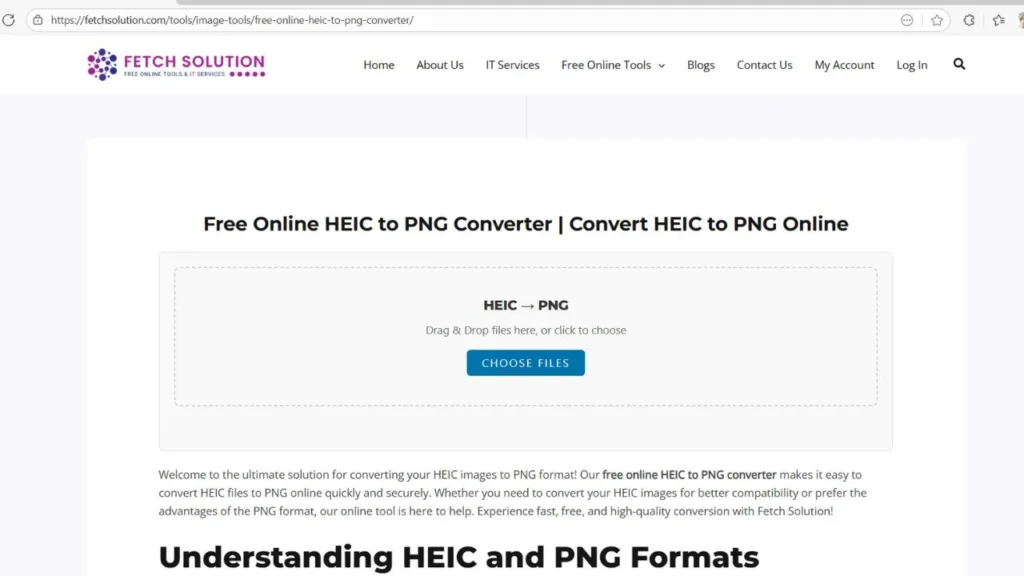
Welcome to the ultimate solution for converting your HEIC images to PNG format! Our free online HEIC to PNG converter makes it easy to convert HEIC files to PNG online quickly and securely. Whether you need to convert your HEIC images for better compatibility or prefer the advantages of the PNG format, our online tool is here to help. Experience fast, free, and high-quality conversion with Fetch Solution!
Understanding HEIC and PNG Formats
What is HEIC Format and Why Convert to PNG?
HEIC, or High Efficiency Image Container, is a modern image file format used by Apple devices since iOS 11. While HEIC offers high efficiency compression, resulting in smaller file sizes with comparable image quality, it’s not universally supported. To ensure compatibility across different operating systems and browsers, you might need to convert HEIC files to a more widely accepted format like PNG.
What is PNG Format?
PNG, or Portable Network Graphics, is a raster image file format that uses lossless compression. This means that when you compress an image as a PNG, no image quality is lost. The PNG format is perfect for images with transparent backgrounds and is a widely supported image file format. Many prefer to convert HEIC to PNG to have the benefits of lossless compression.
Benefits of PNG over HEIC for Web and Design
The PNG format offers several benefits over HEIC, especially for web and design purposes. PNG’s lossless compression ensures that image quality is maintained, which is crucial for detailed graphics and images. Furthermore, PNG supports transparent backgrounds, making it ideal for logos and design elements. Converting HEIC images to PNG format provides greater compatibility and flexibility. This is why many prefer to convert images and convert HEIC files to PNG for various applications.
Step-by-Step Guide for Online Conversion
Using Fetch Solution for Conversion
Converting your HEIC files to PNG online with Fetch Solution is simple and straightforward. The process involves these steps:
- Upload the HEIC images you want to convert using our drag and drop interface.
- Our free online converter quickly processes your images from HEIC to PNG.
- Once the conversion is complete, you can download your new PNG files instantly.
Fetch Solution ensures a seamless and efficient conversion process.
Tips for Ensuring Quality During Conversion
To maintain the best image quality when you convert HEIC to PNG, ensure that the original HEIC images are high resolution. While PNG format employs lossless compression, starting with a high-quality image is essential. Use Fetch Solution’s online converter for optimal results, as our tool is designed to preserve as much detail as possible during the conversion. Convert multiple HEIC files confidently, knowing that image quality is a priority.
How to Convert HEIC to PNG Online Free
Step-by-Step Guide for Free Online HEIC to PNG Conversion
Converting your HEIC files to PNG has never been easier with our free online converter. Simply upload your HEIC images to our online tool, and with a few clicks, you can convert your HEIC images to PNG format. Our image converter ensures a seamless conversion process, allowing you to quickly convert multiple HEIC files without any hassle. Experience the best way to convert your image file format with Fetch Solution.
Using Fetch Solution’s Free HEIC to PNG Converter
Fetch Solution provides a user-friendly online converter to convert HEIC to PNG online. The process is straightforward: upload your HEIC file, and our online tool handles the conversion efficiently. We prioritize image quality and speed, ensuring that your HEIC images to PNG format retain their clarity. Enjoy a seamless experience as you convert images using our free online HEIC to PNG converter.
Tips for High-Quality and Fast Conversion
To ensure the highest image quality during conversion, start with high-resolution HEIC images. Our online converter is designed to preserve detail during the conversion process. For faster conversion of multiple HEIC files to PNG, ensure a stable internet connection. With Fetch Solution, you can confidently convert your HEIC files while maintaining excellent image quality and speed, leveraging the benefits of lossless compression of the PNG format.
Convert Your HEIC Files on Different Platforms
HEIC to PNG Conversion on Windows
If you are using Windows, you can convert HEIC to PNG using our free online converter. Simply access our online tool through your browser, upload your HEIC files, and convert images effortlessly. Our image converter works seamlessly on Windows, allowing you to easily convert your HEIC images to PNG format without any additional software. This provides a convenient method to convert HEIC files to PNG on your Windows machine.
HEIC to PNG Conversion on macOS
For macOS users, converting HEIC images to PNG format is just as easy with our free online converter. Upload your HEIC file via the drag and drop interface, and let our online tool handle the conversion. You can quickly convert HEIC to PNG online, ensuring compatibility with various applications on your macOS system. Enjoy the simplicity and efficiency of our image converter when you convert your HEIC files.
Convert HEIC to PNG on Linux or Ubuntu
Even on Linux or Ubuntu, you can easily convert HEIC files using our free online converter. As our converter operates through your browser, it is compatible with any operating system. Just upload your HEIC images and convert them to the widely supported PNG format. Our online tool makes it simple to convert HEIC to PNG online, ensuring your images are accessible regardless of your operating system.
Why Choose a Free Online HEIC to PNG Converter?
Advantages of Using a Free HEIC to PNG Converter
Using a free online converter to convert HEIC to PNG offers numerous advantages. You can convert your HEIC files to PNG without any cost or software installation. This makes it incredibly convenient for quick conversion tasks. With a reliable online tool, you can easily convert HEIC files while maintaining good image quality and ensuring your images are compatible across different operating systems.
Speed, Security, and Privacy with Fetch Solution
Fetch Solution’s free online converter prioritizes speed, security, and privacy when you convert HEIC to PNG. Our online tool ensures a fast conversion process, allowing you to quickly convert multiple HEIC files. We also guarantee that your files are securely processed and that your privacy is protected. You can confidently upload your HEIC images, knowing that Fetch Solution provides a safe and efficient image conversion experience as you convert your HEIC images.
Support for Transparent PNG and Batch Conversion
Our online converter supports transparent backgrounds for the PNG format, making it perfect for logos and graphics. Additionally, Fetch Solution enables batch conversion, allowing you to convert multiple HEIC files to PNG simultaneously. This feature saves time and effort, especially when dealing with a large number of HEIC images. You can efficiently convert your HEIC files while retaining the advantages of transparent PNG and streamlining your workflow.
Conclusion and Call to Action
Start Converting Your HEIC Images to PNG Now!
Ready to convert your HEIC images to PNG format? Our free online converter is here to help! Upload your HEIC files now and experience fast, secure, and high-quality conversion. Don’t compromise on compatibility—convert your HEIC files with Fetch Solution and ensure your images are accessible on any device. Begin the conversion today and enjoy the benefits of the widely supported PNG format!
Explore More Image Tools from Fetch Solution
At Fetch Solution, we offer a variety of image tools to meet all your image conversion needs. In addition to our HEIC to PNG converter, explore our other online tools for converting to JPG, JPEG, GIF, and more. Whether you need to compress files, resize images, or change the image file format, Fetch Solution has you covered. Discover the full range of our image conversion capabilities and enhance your image management experience.
Share Feedback and Improve Your Experience
We value your feedback and are committed to continuously improving our online converter. If you have any suggestions or encounter any issues while you convert HEIC to PNG, please let us know. Your input helps us enhance our online tools and provide the best way to convert your HEIC files. Share your thoughts with us, and together, we can make Fetch Solution the ultimate image conversion platform.
Frequently Asked Questions (FAQs) about HEIC to PNG Conversion
What to Do if HEIC to PNG Conversion Fails?
If you’re having trouble converting HEIC to PNG, first check that your HEIC file isn’t corrupted and is a valid image format. Refresh the page and try uploading the file again to see if it works.
If the issue persists, try using a different browser or verify that your internet connection is stable. If none of these steps solve the problem, contact our support team – we’ll assist you in completing your HEIC to PNG conversion smoothly.
How to Compress PNG Files After Conversion?
After you convert HEIC to PNG, you might want to compress the PNG file to reduce the file size. You can use various online tools or software to compress your PNG images without significant loss of image quality. Search for “compress PNG online” to find several options. This ensures that your images are optimized for web use while maintaining excellent image quality.
Ensuring Compatibility with Other File Types?
To ensure compatibility with other file types, you can use Fetch Solution to convert images to various image file formats. If you need a JPEG, GIF, or any other image format, our online tools provide seamless conversion. This helps you ensure that your images are compatible across different platforms and applications, making it easy to share and use your files effectively. Consider converting to other image formats using our online tool.
Explore more image converters like our PNG to WebP Converter and JPG to WebP Converter for all your online image optimization needs.
Can I convert multiple HEIC files to PNG at once?
Yes, our free online HEIC to PNG converter allows batch conversions. You can upload multiple HEIC files and convert them to PNG simultaneously for faster results.