
Looking for a seamless way to convert your JPG images to the superior WebP format? Our free online JPG to WebP converter by Fetch Solution is the perfect solution. Achieve smaller file sizes and better image quality effortlessly. Read on to discover the advantages of WebP and how easy it is to start converting today!
Understanding the WebP Format
WebP is a modern image format developed by Google that provides superior lossless and lossy compression for images on the web. It is designed to make web images smaller and richer, thus making the web faster. By converting JPG images to WebP, users can significantly reduce file size while maintaining excellent image quality, which enhances website performance and user experience.
What is WebP?
WebP is an image format employing both lossy and lossless compression. This format supports animation and alpha transparency. WebP offers better compression than older formats like JPEG, PNG, and GIF. When you convert JPG to WebP, you get smaller file sizes without losing image quality. This makes it ideal for web images and improves website loading times.
Benefits of WebP over JPG
The benefits of using the WebP format over JPG are substantial, primarily due to its superior compression algorithms. WebP images typically have smaller file sizes compared to JPG images of comparable quality. This leads to faster page loading speeds, reduced bandwidth consumption, and an overall improved user experience. Converting JPG files to WebP can significantly enhance website performance.
Comparison of File Size and Quality
WebP typically achieves 25-34% smaller file sizes than JPEG at equivalent image quality. This means you can convert images to WebP and save valuable storage space and bandwidth without sacrificing visual fidelity. WebP’s advanced compression techniques ensure that the image quality remains high, making it an excellent alternative to JPG, PNG, and even GIF formats for web images.
How to Convert JPG to WebP
Converting JPG images to WebP format is a straightforward process. Several online tools and software are available to facilitate this conversion. By choosing the right tool and following the steps carefully, you can quickly convert your JPG files to WebP format, taking advantage of its superior compression and image quality benefits, ultimately leading to smaller file sizes.
Using Fetch Solution’s Online JPG to WebP Converter
Fetch Solution offers a free online JPG to WebP converter that makes the conversion process incredibly simple. This online tool allows you to convert images directly in your browser without needing to download or install any software. You can easily convert JPG to WebP, ensuring your web images are optimized for speed and quality. It’s the best JPG to WebP solution.
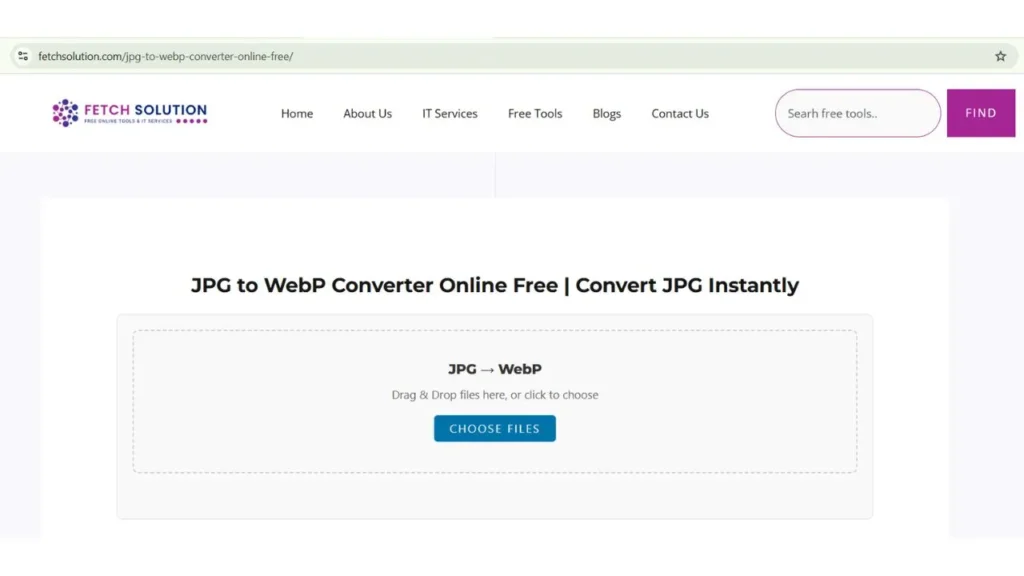
Step-by-Step Conversion Instructions
Here’s how to convert JPG to WebP using Fetch Solution’s online converter. The process involves these simple steps:
- Visit the JPG to WebP converter page.
- Upload your JPG files by dragging and dropping or selecting them from your computer.
- Click the “Convert” button to start the conversion.
- Once the conversion is complete, download your new WebP files.
This simple process allows you to convert multiple JPG files effortlessly.
Tips for Optimal Conversion
For optimal JPG to WebP conversions, start with high-quality JPG images. To achieve the best results when converting JPG files to WebP, it is important to follow these steps:
- Experiment with the compression settings if available to balance file size and image quality.
- Preview the converted WebP image to ensure it meets your quality standards.
- If you need lossless compression, select the appropriate option during the conversion process.
Convert Multiple JPG Files to WebP in Bulk (Free & Fast Converter)
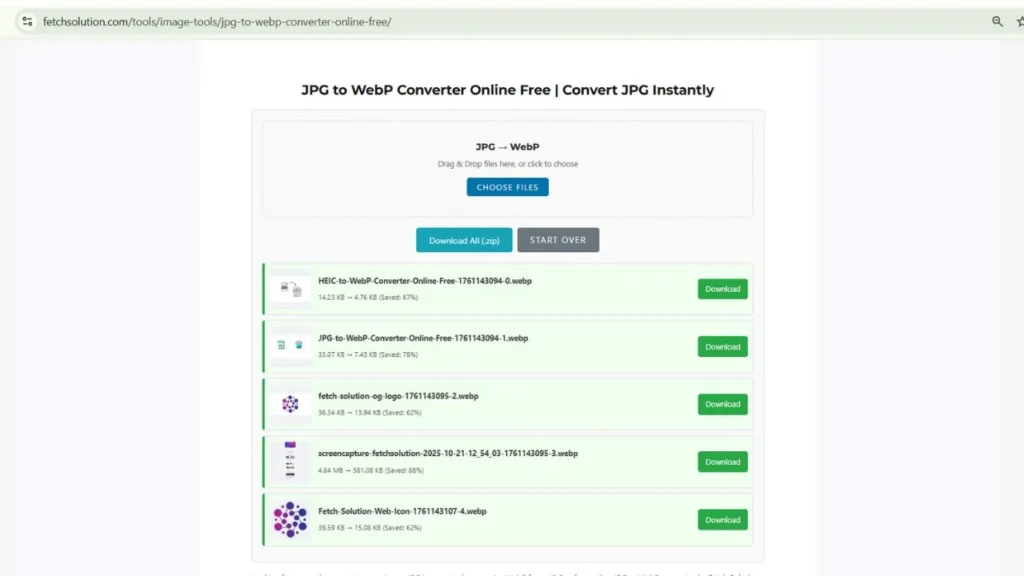
Want to convert many JPG images at once? The Fetch Solution Bulk JPG to WebP Converter lets you process multiple files in one go — fast, secure, and completely free.
You can upload up to 20 JPG images at once if you’re a logged-in user, or up to 5 images if you’re using the tool as a guest. Each upload can be up to 20 MB total, making it ideal for photographers, developers, and digital marketers who need quick, high-quality conversions.
How to Use the Bulk JPG to WebP Converter:
- Click Upload Images and select multiple JPG files (up to your allowed limit).
- Press Convert to start instant bulk processing.
- When the conversion is complete, download your WebP files — individually or together as a ZIP archive.
This free JPG to WebP bulk converter works directly in your browser — no installation or registration required. Simply log in to unlock higher limits and enjoy faster, smoother bulk conversions.
Advantages of Using WebP
Faster Loading Times for Websites
The most significant advantage of using the WebP format is the faster loading times it offers for websites. Since WebP images typically have smaller file sizes than JPG images, web pages with WebP images load more quickly. This improved loading speed enhances the user experience and can also positively impact SEO rankings. When you convert JPG images to WebP, you’re essentially optimizing your website for speed and performance.
Smaller File Sizes without Quality Loss
When you convert JPG files to WebP, you can achieve smaller file sizes without sacrificing image quality. WebP’s superior compression algorithms ensure that the converted images maintain excellent visual fidelity while taking up less storage space and bandwidth. This is particularly beneficial for websites with numerous images, as it can lead to significant savings in server costs and improved website performance.
Improved Image Quality
WebP offers improved image quality compared to JPG, especially at similar file sizes. This is due to WebP’s advanced compression techniques, which reduce artifacts and preserve finer details in images. Converting JPG to WebP can result in sharper, clearer images that enhance the visual appeal of your website. For web images, the ability to maintain high image quality with smaller file sizes is a game-changer.
Use Cases for JPG to WebP Conversion
Optimizing Images for Web Use
Optimizing web images is crucial for website performance, and that’s where the ability to convert JPG to WebP comes in handy. Web images in the WebP format boast smaller file sizes while maintaining excellent image quality, which translates to faster loading times. By converting JPG images to WebP, you ensure a better user experience, leading to increased engagement and improved SEO rankings.
Saving Storage Space on Devices
Devices with limited storage can greatly benefit from the smaller file sizes of WebP images. When you convert JPG files to WebP, you reduce the amount of storage space taken up by your images, allowing you to store more files or free up space for other applications. This is particularly useful for mobile devices and cloud storage services, where every byte counts.
Improving Site Performance and SEO
Website speed is a critical factor for both user experience and search engine optimization (SEO). By converting JPG files to WebP, you can significantly reduce the file size of your web images, leading to faster page loading times. Faster loading speeds improve user engagement, reduce bounce rates, and positively impact your website’s SEO performance. Ultimately, JPG to WebP conversions can improve your site’s visibility and ranking.
Why Choose Fetch Solution’s Free JPG to WebP Converter?
Secure and instant processing
Fetch Solution’s free online JPG to WebP converter offers secure and instant processing. The online tool ensures that your JPG files are converted quickly without compromising your data security. You can convert your JPG images to WebP format with confidence, knowing that your information is protected and the conversion process is efficient and reliable. It is the best JPG to WebP converter.
No sign-up or installation required
One of the key benefits of Fetch Solution’s JPG to WebP converter is that it requires no sign-up or installation. You can immediately convert images to WebP online for free without any hassle. This accessibility makes the conversion process simple and convenient, allowing you to quickly optimize your web images without any additional steps or software installations. You can convert JPG to WebP quickly and easily.
Works on mobile and desktop
Fetch Solution’s online JPG to WebP converter is designed to work seamlessly on both mobile and desktop devices. This ensures that you can convert JPG images to WebP regardless of the device you are using. Whether you’re on a computer or a smartphone, you can easily access the online tool and convert images with ease. This versatility makes it a convenient choice for all users, and makes converting JPG files to WebP a smooth experience.
Start optimizing your images today! Use Fetch Solution’s free JPG to WebP Converter and experience faster loading, smaller file sizes, and superior image quality.
Frequently Asked Questions
Can I convert multiple JPG files to WebP at once?
Yes. Logged-in users can upload and convert up to 20 JPG images per batch, while guest users can upload up to 5 images. All conversions are handled quickly and securely in your browser.
How Does the Quality of WebP Compare to JPG?
The image quality of WebP is generally better than JPG at comparable file sizes. WebP uses advanced compression algorithms that preserve more detail and reduce artifacts, resulting in sharper, clearer images. When you convert JPG to WebP, you can expect to maintain or even improve image quality while significantly reducing file size. This makes WebP a superior format for web images.
What is the maximum file size allowed?
Each batch upload supports up to 20 MB total size, ensuring smooth and fast performance even with multiple high-resolution images.
Is Fetch Solution’s bulk JPG to WebP converter free to use?
Yes, it’s completely free for both guest and registered users. Logging in simply allows you to convert more images per upload.
Will bulk conversion reduce image quality?
No — even during bulk conversions, our tool uses advanced compression to maintain sharp, clear image quality while minimizing file size.
Why log in to Fetch Solution?
Logging in gives you access to higher limits (20 files per upload) and priority conversion speed — perfect for professionals who work with large sets of images.